


Kansas State Fair
4.65.00 Reviews
App Specs
- Version
- 3.0.2
- Updated On
- License
- Free
- Downloads
- 10,000+
- Developer
- Kansas State Fair
- Categories
- Events
- Platform
- Android
Screenshots
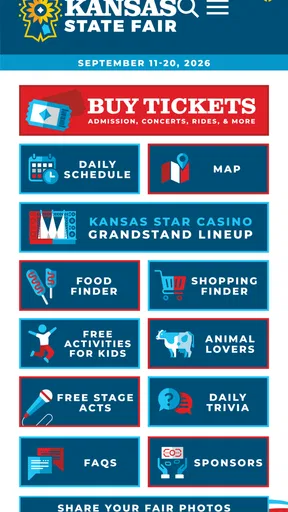
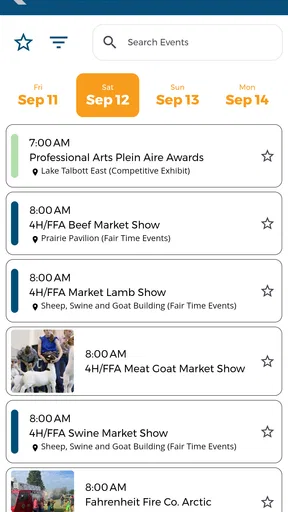
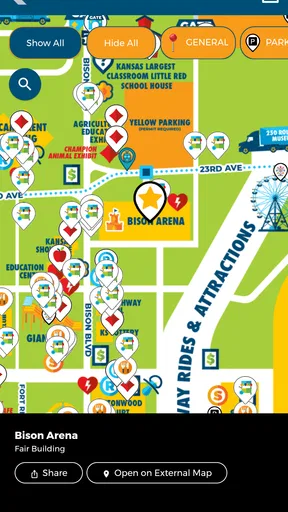
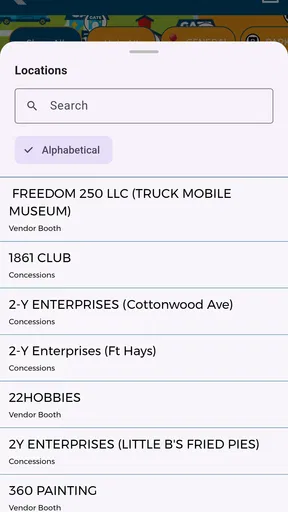
 Analysis by AppCompare
Planning a visit to the Kansas State Fair is easier when the information you need is gathered in one place, and that is the role I found for Kansas State Fair. This free events app comes from the Kansas State Fair itself, rather than from a general travel platform or an unofficial fan project. I approached it as a practical companion for preparing a fair visit, checking details while away from home, and reducing the amount of searching needed before heading out.
My overall impression is positive, but quite specific: this is most useful when your trip is already connected to the Kansas State Fair. It is not a broad event-discovery tool, a social network, or a replacement for every planning service on your phone. Its value comes from being focused. If you want fair-related information in a dedicated place, it makes sense. If you are looking for a general calendar covering many local events, another app will probably suit you better.
Getting started without unnecessary frustration
The app is listed as free and suitable for everyone, which makes it approachable for families, occasional visitors, and people who do not want to create a complicated planning system. It runs on Android versions from 6.0 onward, so compatibility should cover many older phones as well as newer devices. I would still install it before leaving home rather than waiting until I am already at the grounds, because checking the app in a calm setting makes it easier to notice whether it opens correctly and whether the information you need is easy to locate.
One common point of friction with any event app is assuming that installation alone solves the planning problem. It does not. I would open the app soon after installing it, browse through the available sections, and decide which information matters for my particular visit. A family coming for a full day may need a different approach from someone attending one attraction or meeting friends for a short stop. Taking a few minutes to understand the layout can prevent hurried searching later.
The current release is version 3.0.2, and the app was released on August 12, 2024. Those details are useful when troubleshooting because an outdated installation can behave differently from the current one. If the app appears incomplete or does not behave as expected, I would first check whether the installed version is current through the relevant app store. I would also confirm that the phone meets the minimum operating-system requirement before spending time changing settings.
My first practical tip is to test the app before the visit, not at the entrance. Open it on both Wi-Fi and mobile data if possible, move between its main areas, and close and reopen it once. This is not about hunting for hidden functions; it is a simple way to separate a setup issue from a temporary network problem. It also gives you a chance to decide what information you may want to remember or write down before the day becomes busy.
Where planning can become confusing
A dedicated fair app can feel more direct than searching the web, but it also has a narrower purpose. A search engine may show independent visitor advice, maps, weather information, transportation options, or conversations about the event. The official app is better viewed as a focused source for fair-specific material, while those other tools remain useful for the parts of the trip that sit outside the fair itself.
Worth Reading Before You Choose

EA SPORTS FC Mobile 26 Is a Bigger Football Game, but It Takes Time

Flipboard Shows What News Apps Must Do Beyond the Feed

Switching to Android Auto Means Rethinking Your Driving Routine

Google Calendar Makes a Crowded Week Easier to Manage

Ludo King Makes the Most of the Minutes Between Plans

Baby Panda World Brings Quick Play to Modern Phones, but Its Game Library Feels Busy
That distinction matters when something appears to be missing. If you are trying to plan the drive, compare hotels, or coordinate a wider Kansas itinerary, the app is not necessarily the right place to solve every question. I would use it for the fair portion of the plan and keep a maps app, calendar, or notes app available for everything around it. Expecting one focused application to replace all of those tools is an easy way to become frustrated.
Another source of confusion is treating an official app as if it guarantees that every piece of information will be equally useful for every visitor. A parent may care about timing and family coordination, while a returning visitor may only want a quick reference during the day. I found that the best experience comes from deciding what I need first, then using the app as a reference instead of repeatedly browsing without a goal.
The app has an average rating of 4.6 from around 20 ratings, with about five written reviews, and more than 10 thousand installs. That suggests a modest but encouraging user base. I would read the rating as a sign that the app is working well for its intended audience, not as proof that it will fit every planning style. A smaller event-specific app can be very convenient for one visitor and feel limited to another who wants extensive travel tools.
Simple checks before relying on it
Before I depend on any event application during a busy day, I run through a short preparation routine. I make sure the phone has enough battery, confirm that the app opens normally, and check that mobile data is available if I expect to use it away from Wi-Fi. I also avoid assuming that a screen I viewed earlier will remain available in exactly the same way later, so I note down especially important details in my own words.
This approach is particularly helpful when travelling with other people. Instead of handing the phone around while everyone is waiting, I can review the relevant information in advance and share the plan verbally. If plans change, I can return to the app for a fresh look. The result is less dependence on one person holding the device at all times.
I would also check the phone’s date and time settings and make sure the app has completed its initial loading before leaving. These are ordinary checks, but event information is time-sensitive by nature. If a page loads slowly or appears blank, I would not immediately assume that the fair information itself is unavailable. I would retry on a stable connection, close and reopen the app, and then compare the result with the official fair channels if the problem continues.
For families, my preferred workflow is to agree on a meeting point and a fallback plan before arriving. The app can support the information side of the visit, but it cannot prevent a phone from losing signal, running out of power, or being left in a vehicle. Writing down one or two essential details is a low-effort backup that makes the whole day less dependent on technology.
For a solo visitor, the trade-off is different. A focused official app may be enough, and carrying several planning tools may feel excessive. In that case, I would spend a little more time exploring the app at home and keep a screenshot or note of anything I expect to revisit. That creates a personal quick-reference layer without requiring a separate event-planning system.
Recovering when the workflow breaks
If the app stops responding, my first step is simple: I close it completely and open it again. I then test another connection, since a weak mobile signal can look like an application failure. If the problem affects only one screen, I return to the main area and try navigating back rather than repeatedly tapping the same control. These are basic actions, but they often identify whether the issue is temporary or consistent.
If the app still behaves poorly, I check for an available update and restart the phone. I would avoid deleting the app immediately, especially if I have not yet written down the information I need. Reinstalling can be a reasonable later step, but it is not my first choice during an active visit because it adds time and may require repeating the initial setup.
A useful recovery habit is to separate the urgent question from the application itself. If I need one piece of information right now, I do not keep refreshing the same screen indefinitely. I use any notes I prepared, ask a member of the fair staff, or consult the official website or other official communication channel. That does not make the app useless; it simply recognises that a single source should not be the only fallback during a crowded public event.
When reporting a persistent problem, I would record the phone model, operating-system version, app version, and the action that caused the issue. Saying that “it did not work” is less helpful than explaining whether the app failed to open, a particular section would not load, or the information appeared outdated. This kind of detail gives the developer, Kansas State Fair, a clearer path to investigate.
The most important recovery trade-off is convenience versus preparation. The app can reduce searching when it works smoothly, but the benefit is greatest when I prepare a backup for the few details that matter most. I would not print an entire itinerary just for this application, yet I would keep essential meeting or timing information somewhere accessible if the day involves children, older relatives, or a tight schedule.
When the phone is not the real problem
Sometimes an event app receives the blame for a problem caused by circumstances around it. A crowded fairground can make mobile data unreliable, a phone battery can fall quickly in constant use, and plans can change faster than anyone can update a screen. In those situations, reinstalling the app will not solve the underlying issue.
There is also a difference between information being hard to find and information being absent. If I am browsing without a clear question, the app may feel less useful simply because I have not chosen a starting point. I try searching with a purpose: What do I need before leaving? What do I need while walking around? What should I tell the people with me? This turns a vague browsing session into a short checklist.
The same principle applies when comparing the app with alternatives. A general web search is often better for broad travel planning and independent context. A calendar app is better for combining the fair with work, school, and appointments. A notes app is better for storing a personal packing list or meeting plan. The official application is the better choice when I want fair-specific information in a dedicated source and do not want to assemble that part of the plan from scattered results.
I would skip it if my interest is only in finding many unrelated events, building a multi-stop holiday itinerary, or collecting extensive user commentary. I would also avoid making it the sole tool for a group whose plans are likely to change constantly. In those cases, the app can still be a useful reference, but a shared calendar, messaging group, or map may handle coordination more effectively.
On the other hand, it is a good fit for someone attending the Kansas State Fair for the first time, a returning visitor who wants a dedicated reference, or a family that prefers official information over a collection of search results. Its focused nature is a strength when the question is fair-specific. It becomes a limitation only when I ask it to manage the entire trip.
How I would use it on a real visit
Imagine I am taking my family to the fair and expect everyone to want different things. Before leaving, I open the app, review the information relevant to the day, and make a short note of the details that would be inconvenient to look up again. I then agree on where we will regroup if we become separated. During the visit, I use the app as a reference rather than keeping it open continuously, which saves battery and reduces unnecessary screen time.
If one family member asks a question while we are walking, I can check the appropriate section instead of searching the entire internet. If the connection is slow, I switch to the backup note for the most important details and try again later. This workflow recognises both sides of the app: it is convenient for focused checking, but it is not a substitute for basic group planning.
For a solo visitor, I would use a lighter version of the same routine. I would explore the app before arriving, identify the information most likely to matter, and keep my phone charged. I would not spend the whole day repeatedly opening it unless I had a specific reason. That makes it a quiet support tool rather than something that dominates the visit.
One less obvious benefit of this approach is that it helps reveal whether I actually need another planning app. After a short trial, I can tell whether the official app covers my fair-related needs and reserve other tools for transport, weather, or personal scheduling. That prevents duplicated effort and keeps the phone’s planning setup manageable.
What the rating and ownership tell me
The app’s 4.6 average is encouraging, especially because it is tied to an official event rather than a broad category with millions of unrelated users. Still, I would judge it by usefulness during my own kind of visit. Ratings cannot show whether the navigation feels natural to a first-time visitor, whether a family needs more coordination tools, or whether a traveller wants broader destination planning.
Knowing that the developer is Kansas State Fair also changes how I interpret the app. The official connection is its main reason to choose it over a generic event directory. It gives the app a clear purpose and makes it more relevant to fair visitors than a general listing service. At the same time, an official focus means I should not expect the independent opinions, comparisons, or wide-ranging travel advice that third-party platforms often provide.
Because the app is free, trying it carries little financial risk. The real cost is attention: installation time, phone storage, battery use, and the possibility of relying on it without a backup. For me, that cost is reasonable when I am actually planning a visit. Someone with no connection to the fair has little reason to keep it installed after deciding it is not relevant to their plans.
The Everyone age rating is also appropriate for a public event companion intended for a broad audience. I would still make decisions based on the needs of the people attending, especially children or older relatives, because an age rating describes suitability of the app’s content rather than the practical demands of a day at a busy fair.
My practical verdict
I recommend Kansas State Fair to people who want a focused, official companion for visiting the fair and are comfortable using it alongside ordinary phone tools. Its strongest quality is not a long list of extras; it is the direct connection to the event it represents. I appreciate that the app can serve as a central reference instead of forcing visitors to piece together fair information from unrelated searches.
I would install it before the visit, test it on the phone and connection I plan to use, and prepare a small backup for anything essential. If it does not open, I would try the usual recovery steps before assuming the fair information is at fault. If the issue persists, I would switch to official alternative channels or ask staff rather than allowing a technical problem to control the day.
The best way to use this app is as a focused fair guide, not as your entire travel plan. That expectation matches its purpose and avoids most of the frustration I can imagine a visitor having. For fair-specific preparation, it is a sensible free download from Kansas State Fair. For wider event discovery, detailed travel coordination, or group scheduling, I would pair it with a general-purpose tool or choose a different app for those tasks.
In short, I see it as a practical companion with a clear audience. It is worth trying if the Kansas State Fair is part of your plans, especially if you prefer an official source and want to prepare before arriving. Just keep your expectations realistic, check the setup early, and maintain a simple backup for the information you cannot afford to lose during a busy day.
Pros
- Easy access to fair schedules
- events
- and daily activities
- Useful information for planning visits around concerts and attractions
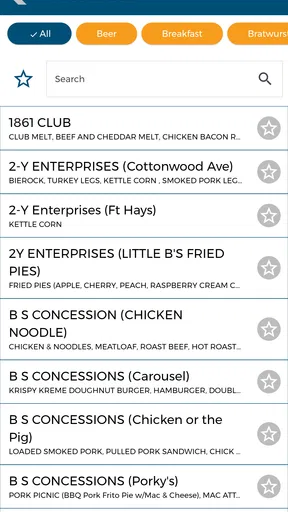
- Helps visitors discover food vendors
- exhibits
- and entertainment
- Convenient way to check fair updates while traveling
- Simple resource for first-time visitors exploring the grounds
Cons
- Some information may become outdated after the fair ends
- Event details can vary and may require checking official updates
- The app may offer limited value outside the fair season
- Navigation may feel basic compared with larger event apps
- Some features may depend on an internet connection
FAQs for Kansas State Fair
What is the Kansas State Fair app used for?
The Kansas State Fair app is designed to help visitors plan and enjoy their trip to the fairgrounds. It typically provides useful information such as event schedules, concerts, attractions, food vendors, exhibits, maps, ticket details, and important announcements. After exploring its sections, I found it especially helpful for checking what is happening during each day and organizing a visit around preferred activities.
Can I use the Kansas State Fair app to view the event schedule?
Yes, the app is intended to make the fair’s daily schedule easier to browse. Visitors can generally look for concerts, livestock shows, competitions, family activities, demonstrations, and other special events. Schedule information may change because of weather, performer availability, or operational decisions, so it is still a good idea to check the app regularly while attending the Kansas State Fair.
Does the Kansas State Fair app include a map of the fairgrounds?
The Kansas State Fair app may include an interactive or informational map showing important locations throughout the fairgrounds. Depending on the current version, this can help users find stages, exhibition buildings, food areas, restrooms, entrances, parking zones, and other facilities. The map is particularly useful for first-time visitors, although signal strength and GPS accuracy can affect navigation.
Do I need an internet connection to use the Kansas State Fair app?
Some features may work without a constant internet connection, especially information that has already been loaded on the device. However, an internet connection may be necessary for updated schedules, announcements, ticket information, interactive maps, or other live content. Before arriving, it is sensible to open the app and review important details, since mobile coverage can vary across a busy fairground.
Is the Kansas State Fair app free to download?
The Kansas State Fair app is generally available as a free download for supported Android or iOS devices, although attending certain events, purchasing admission, or using specific fair attractions may involve separate costs. Users should review the app-store listing and official fair information for the latest availability, device requirements, privacy details, and any changes to ticketing or payment procedures.


